
One of the great benefits of Cogniti is educator to educator sharing within and between institutions. Sharing can be tightly controlled by organisational admins and by artefact (e.g. agents, mini apps, etc) creators.
Sometimes there may be a need for an organisational administrator to limit how users from their own organisation interact with artefacts that have been created by other organisations. For example, prevent your own users from seeing agents shared by users from other organisations. Or, prevent your own users from being able to clone a mini app that has been created by users from another organisation.
By default, this is allowed – as long as the creator has allowed it.
However, organisational administrators can add an additional restriction.
To do so, go to the organisational edit screen, and click on the External content tab. A series of toggles will appear, for example:
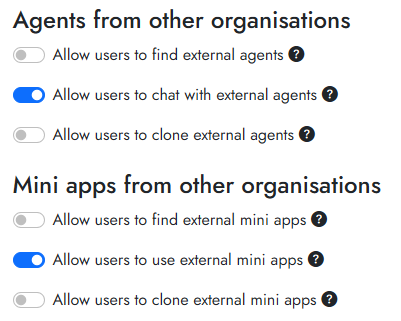
Select the configuration you want, and click Save organisation.
The above example allows users from one organisation to chat with agents and use mini apps that come from another organisation as long as they have the direct link, but they cannot see those agents or mini apps in the list, nor clone them.


