If you are the creator, or an authorised administrator, of an agent, you are able to see a de-identified list of conversations that users have had with that agent. You can also have AI summarise the conversations for you to quickly understand what users are asking.
This ability is important because it allows:
- Teachers to better understand any misconceptions that students may have, to inform their teaching
- Teachers to monitor the quality of AI responses
- Monitoring of potential abuse
View conversation history #
To access the conversation history, from Agent HQ find your agent and click on the View conversation history icon.

This will show a list of conversations, with the identity of the user(s) blanked out.

You can view the conversation itself by clicking on the speech bubble icon on the right.
If users have flagged an AI response, or rated it positively or negatively, this will be shown in the conversation history alongside any comments that the user left as feedback.
View insights #
To access agent insights, from Agent HQ find your agent and click on the View insights icon.
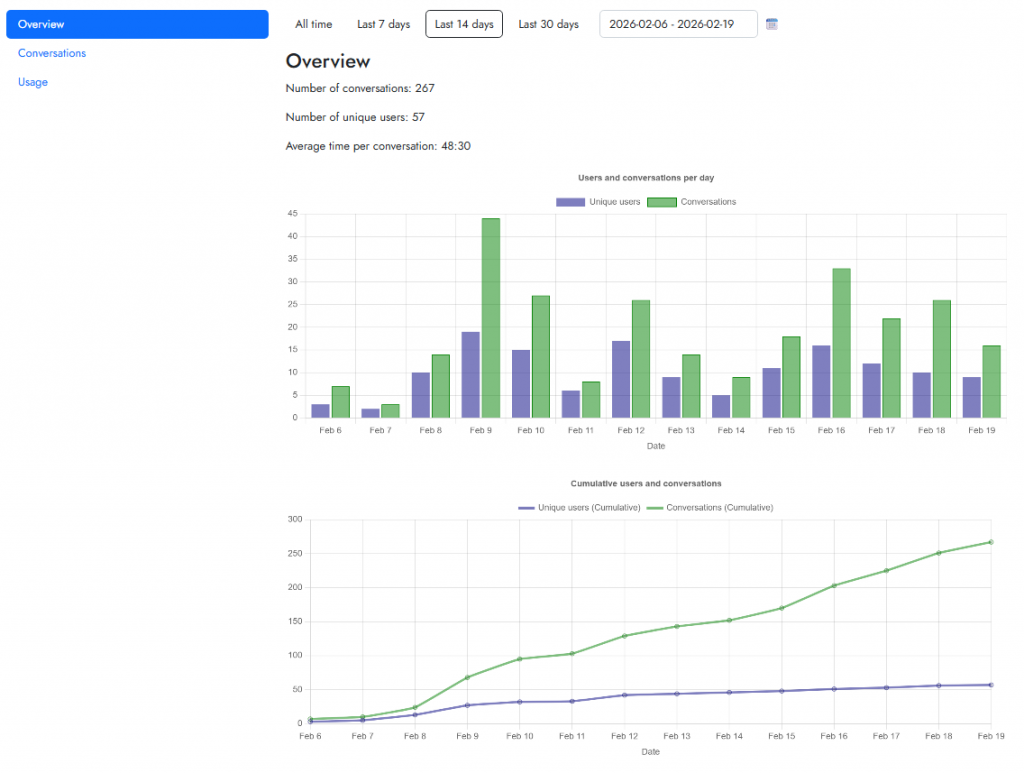
You’ll see some basic stats in the Overview tab.
Navigate to the Conversations tab to see an AI-generated summary of what users are asking the agent.


