OpenAI and Microsoft have deprecated and retired the GPT-4 series of AI models that were once a mainstay of Cogniti agents.
This means that agents that use the GPT-4 series of AI models (e.g. GPT-4o) will no longer function as expected. These agents will need to be migrated to use a more modern AI model such as the GPT-5 series (e.g. GPT-5.1, GPT-5.2, GPT-5.4).
Select a new AI model #
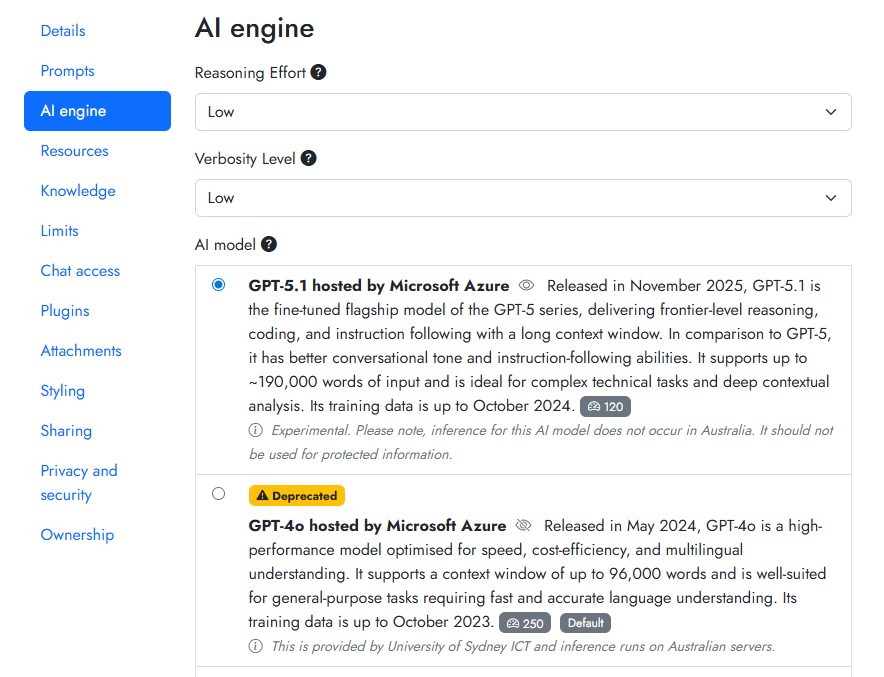
In your agent settings, navigate to the AI engine tab, and select a non-deprecated AI model. If no such model is available, contact your system administrator and ask them to make an AI model available.
Choose new settings #
If you are migrating to the GPT-5 series, these are known as ‘reasoning models’ and have different settings to the GPT-4 series (which had ‘temperature’ being configurable).
To most closely mimic GPT-4 series behaviour in a GPT-5 series model, pick None or Low for the Reasoning effort dropdown.
If your agent must perform complex mathematics or similar STEM calculations or reasoning, you should experiment with setting a higher Reasoning effort.
Update the system message #
Different AI models behave differently. This includes how they respond to your system message. When migrating between series (e.g. from GPT-4 series to GPT-5 series), you will likely need to refine the system message.
We have built a migration agent to help. The migration agent’s role is to take your existing system message and help you tweak it to perform better with the GPT-5 series or Claude models.
To use the migration agent, copy your system message from your existing agent, and paste it into the chat box of the migration agent. It will help you rewrite your system message and explain the changes it has suggested.
After you have checked the suggested changes, copy the system message and paste it back into your agent. Remember to save your agent, and test some conversations with it. It may take a few rounds to get it working well.
A few general notes are important when migrating to the GPT-5 series.
- GPT-5 series models are more steerable, but they require more specific and explicit instructions. They are not as performant with vague system messages. They follow instructions very literally.
- Ensure that there are no internal inconsistencies or contradictions within your system message.
- Be explicit about desired length and format.
- Consider structuring your prompts using tags or headings.
For more information about prompting the GPT-5 series, check out the documentation for GPT-5.1, GPT-5.2, GPT-5.4, and the Claude models.


