The agent editor has an edit history button. You may want to use this if you have changed your agent and you prefer a previous version or want to iterate from a previous version.
Please note: Only the 10 most recent versions are automatically saved. If you wish to keep a version for longer, you can pin it.
Only certain settings are versioned: the name, description, information for users, system message, AI model settings, and the conversation starters.
To save a version #
Cogniti will automatically save a version for you every time you make a change and save the agent.
To restore a version #
In the agent edit page, next to the save button, click the clock button:
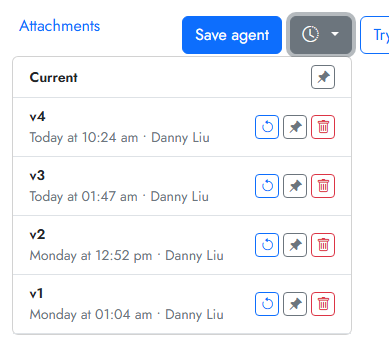
Click the cycle button to restore a previous version.
Click the pin button to pin a previous version. You can also give it a memorable name.
Click the delete button to remove the saved version. This cannot be undone.


