
Cogniti artefacts (e.g. agents, mini apps, sandboxes) have the concept of state – this plays a role in determining when the artefact is available and what kinds of interactions it supports.
You can see the current state represented in the button on the top right of the editor page, for example:

To change the state, click the button and select a new state:
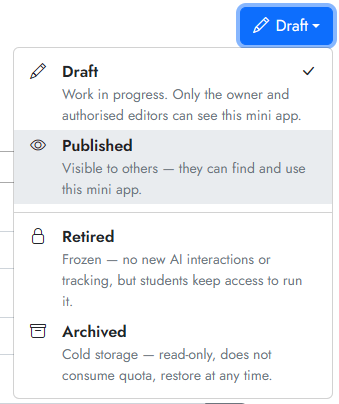
The new state will take effect immediately, without you pressing Save for the artefact.
What do the different states mean? #
- All newly created artefacts default to the Draft state. In this state, students are not able to access the agent, mini app, sandbox, etc.
- To make your artefact available, select the Published state. You’ll also need to ensure that the permissions are set properly as well.
- To freeze new AI-driven interactions with your artefact, choose the Retired state. The exact implications of this state differ by artefact and is described in the help text.
- For retired agents: no new conversations can happen, but the agent is still available and previous conversations are still accessible.
- For retired mini apps: no new AI-driven interactions or telemetry are possible, but the mini app can still be run.
- For retired sandboxes: no new interactions are possible, but the sandbox is still visible and its agents are still accessible.
- To remove an artefact from service but not delete it, choose Archived. Archived agents, mini apps, sandboxes, etc will not take up your allocated quota to create these artefacts.


